How to Use Upvote.Net Lead Finder to Find Reddit Leads
 Sam Wilson
Table of Contents▼
- What does Upvote.Net Lead Finder do?
- How do you set up tracking terms for better Reddit matches?
- How should you review a Reddit lead before replying?
- How do Mentions and Search fit into the workflow?
- What should you do after Lead Finder surfaces a match?
- How much does Lead Finder cost, and what should you expect?
- Frequently asked questions
Upvote.Net Lead Finder helps you find Reddit conversations where potential customers describe a problem your business solves. You can review the subreddit, thread activity, and relevant context in one place, then decide which conversations deserve a closer look and where you have something useful to add.
Lead Finder costs $30 for 30 days of access at launch. Start with the phrases your potential customers use, then build a short list of conversations worth reading.
Key takeaways
- Add the language your buyers use, including problem, comparison, alternative, and competitor terms.
- Use Leads to qualify a thread, Mentions to triage brand and term discussions, and Search to test a new query.
- Read the full Reddit thread and subreddit rules before you write or purchase any separate comment service.
- Treat traffic potential and sample values as prioritization cues, not measured customer or traffic outcomes.
What does Upvote.Net Lead Finder do?
Lead Finder is a Reddit opportunity workspace for discovering, reviewing, and organizing conversations that may fit your offer. It brings buyer language, subreddit context, activity, relevance cues, and workflow status into one place so you can choose a useful next step.
If Reddit lead generation is part of your plan, Lead Finder gives you a place to turn that research into a regular review process.
Job | Lead Finder surface | What to inspect | Useful next step |
|---|---|---|---|
Discover opportunities | Leads | Thread title, subreddit, age, activity, relevance, and traffic-potential cue | Open the thread and qualify it |
Monitor your market | Mentions | Brand, competitor, product, or problem terms in context | Mark, save, exclude, or plan a reply |
Test a new idea | Reddit Search | One query and the communities it returns | Refine the query or add it to tracking |
Keep the feed useful | Leads Settings | Tracking terms, mention monitors, favorites, excluded authors, notifications | Remove noise and keep high-intent language |
Review the wider picture | Leads Dashboard | Summaries and top leads or mentions | Choose what deserves deeper review |
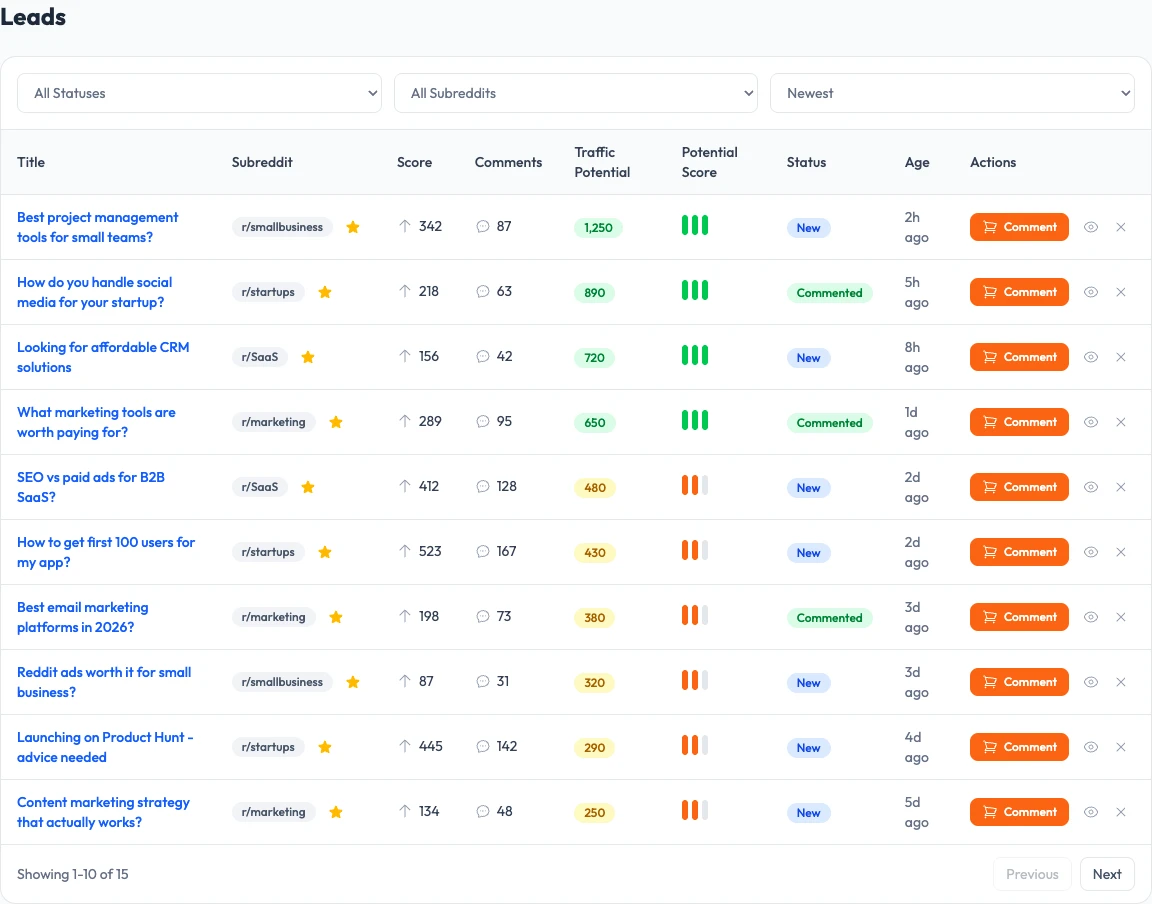
Sample data: the Leads table groups example threads by review fields and actions.
How do you set up tracking terms for better Reddit matches?
Set up tracking terms around the language a potential customer would type, not only the polished category name on your homepage. Combine product categories with problems, comparisons, alternatives, competitor names, and the specific wording you hear in customer support and sales conversations.
Open Lead Finder → Settings in your Upvote.Net dashboard. The tracking terms guide explains the controls.
- Name the buyer problem. Add phrases such as “project management tools for a small team,” “CRM alternative,” or “how do I track customer requests.” Use the language of the problem, not a long feature list.
- Add comparison terms. Include alternatives, competitor names, “versus,” “worth it,” and pricing questions. Comparison threads often reveal a decision that is already in progress.
- Add product and brand terms. Track your brand, product names, common misspellings, and the category terms that lead people toward your offer.
- Review and tighten. Keep terms that return useful conversations. Remove broad phrases that fill the feed with jokes, news, unrelated communities, or people who cannot use your product.
Keep your first set of ongoing monitors small.
Broad terms add noise and make useful conversations harder to spot.
Use Reddit Search when you want to explore a phrase quickly. When the same query keeps producing useful threads, move it into Settings so you can review it as part of the regular workflow.
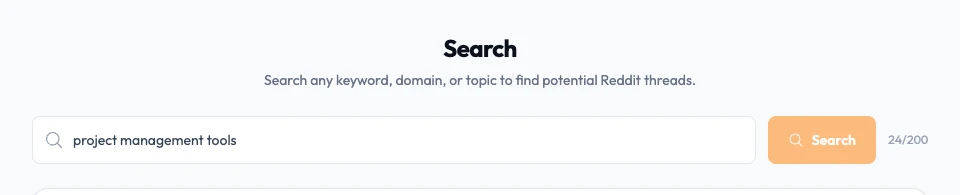
Example: a buyer query entered in the Search form, before reviewing results.
How should you review a Reddit lead before replying?
Review a Reddit lead in two passes. First, use the Lead Finder row to decide whether the thread deserves your time.
Then open Reddit and read the original post, replies, moderation tone, and community rules before you draft a response or choose a separate service.
The lead row is a triage aid, not a verdict. Use this checklist:
- Confirm the problem. Can you explain the poster’s need in one sentence? If you cannot, the match is probably too broad.
- Check community fit. Look at the subreddit and its rules. A high-activity thread can still be a poor target if the community removes commercial replies.
- Read the discussion. Look for existing answers, objections, sarcasm, duplicate recommendations, and signs that the question has already been resolved.
- Choose the response level. Add a useful comment when you can answer the question, save or watch the thread when timing matters, and dismiss it when your offer does not fit.
Review question | Keep for action | Watch or dismiss |
|---|---|---|
Does the post describe a problem your offer solves? | The need is specific and recognizable | The match depends on a vague category word |
Is the subreddit a sensible place for the conversation? | The community discusses the topic and allows the format | The rules or culture reject promotional participation |
Is there room to help? | The question is open, incomplete, or asks for experience | A strong answer already resolves the issue |
What would your reply add? | A concrete explanation, example, or next step | A product pitch would be the only contribution |
The traffic potential field is a prioritization cue displayed with a thread. Use it alongside relevance and activity; it does not report visits to your website.
Reddit’s Rules ask participants to follow community rules, participate authentically, and avoid spam or content manipulation. Apply those rules before you act on a match.
How do Mentions and Search fit into the workflow?
Mentions and Search answer different discovery questions. Mentions help you monitor brand, competitor, product, and chosen-term conversations as they appear.
Search helps you investigate one query quickly, inspect the communities it touches, and decide whether the query deserves ongoing tracking.
Use the two surfaces in this order:
- Search for exploration. Try buyer questions, alternatives, competitor names, pricing language, and problem phrases. Open a few threads and note the wording people actually use.
- Settings for repeatability. Turn the strongest phrases into tracking terms or mention monitors. Add useful communities to favorites and exclude sources that repeatedly create noise.
- Mentions for triage. Review the context before labeling a thread as praise, complaint, comparison, or opportunity. A snippet can hide a resolved question or a joke.
- Leads for prioritization. Return to the lead queue when you need a short list of conversations that fit your current campaign or offer.
On Reddit itself, you can search within a community or search a post’s comments to check what people have already discussed. Reddit’s search help explains those native search options.
The Mentions monitoring guide covers the operational review in more detail. If a thread appears to rank for a buyer question, use How to Find Reddit Threads That Rank on Google to verify the search context before you invest in a reply.
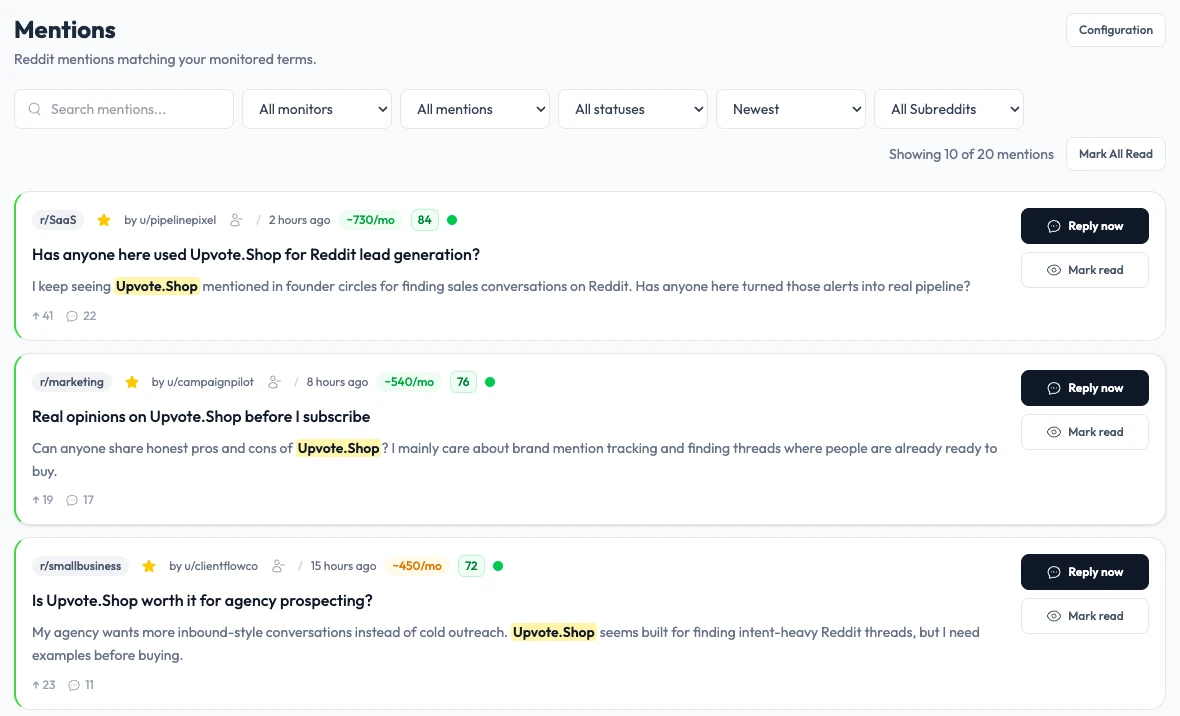
Sample data: Mentions cards show example conversations, statuses, and reply controls.
What should you do after Lead Finder surfaces a match?
Choose the smallest action that helps the conversation. You might write a useful public answer, save the thread for a later review, watch it for replies, or dismiss it.
Lead Finder supports this decision; it does not publish a reply on your behalf or replace the Reddit account and community judgment required to participate.
Use this action ladder:
- Reply when you can answer. Address the question in the thread’s language. Explain the relevant idea first and mention your product only when it genuinely fits.
- Watch when timing matters. Keep a thread that may become useful after new replies, a product launch, or a clearer buyer question.
- Save the community pattern. Favorite a subreddit when it repeatedly produces useful conversations. Record the phrase that made the thread valuable.
- Dismiss poor matches. Remove noise from future review by dismissing irrelevant threads, excluding repeated sources, or tightening the term that found them.
- Review separately before purchase. Any comment purchase or other paid action is a separate decision. Read the thread and community rules first, then use the correct service flow if the placement deserves it.
Reddit’s spam guidance defines spam as repeated, unwanted, or unsolicited actions and notes that some communities restrict promotional content even when other communities allow it. It also warns against repeated similar comments and bots intended to promote products or services.
Read the official spam guidance before you build a repeat process.
How much does Lead Finder cost, and what should you expect?
Lead Finder costs $30 for 30 days of access, according to the September 16, 2026 launch announcement. That price gives you time to configure terms, review matches, refine noisy queries, and learn which conversations deserve a response from someone on your team.
Treat the first 30 days as a learning cycle:
- Start with a short list of problem and comparison terms.
- Read enough full threads to recognize a strong match in your niche.
- Remove terms that create noise and keep language that reflects real buyer questions.
- Track which decisions you made, not just how many rows appeared.
- Recheck your community choices before you write or purchase any comment.
If you need the broad channel playbook, read Reddit lead generation. For the product checklist before a comment order, use How to use Reddit Leads before ordering.
Then open the Upvote.Net dashboard and start with a small, reviewable set of terms.
Frequently asked questions
What is Upvote.Net Reddit Lead Finder?
Upvote.Net Reddit Lead Finder is a workspace for finding and reviewing Reddit conversations that may fit your offer. You add buyer language, inspect the returned thread context and activity, then choose whether to reply, watch, save, or dismiss the opportunity after human review.
How do I set up Lead Finder?
Start with a small set of problem phrases, comparison terms, alternatives, competitor names, brand terms, and common misspellings. Review the first matches, remove noisy wording, and promote the phrases that repeatedly produce useful conversations into your ongoing Lead Finder settings.
Does Lead Finder guarantee customers or Reddit traffic?
No.
Lead Finder helps you discover and prioritize conversations, but it cannot promise customers, visits, conversions, or a particular amount of Reddit traffic.
Activity and traffic-potential cues are inputs for your review; the quality of the eventual outcome depends on fit, timing, community rules, and the value of your response.
Does Lead Finder post Reddit replies automatically?
No.
The workflow ends with a human decision about what to do next.
You should open the original thread, read the replies and subreddit rules, and write or approve any response yourself.
Lead Finder supports discovery and triage; it does not claim to publish an automatic Reddit reply.
What is the difference between Leads, Mentions, and Search?
Leads gives you a prioritized opportunity queue, Mentions helps you monitor brand, competitor, product, or chosen-term discussions, and Search lets you test one query quickly. Use Search to explore, Settings to keep useful terms, Mentions to monitor them, and Leads to review the resulting opportunities.
How much does Upvote.Net Lead Finder cost?
The September 16, 2026 launch announcement lists Lead Finder at $30 for 30 days of access. That period gives you time to configure terms, review matches, refine noisy queries, and decide which conversations deserve attention.
A separate comment purchase is its own decision and is not included in this price.

Hey, I'm Sam. I've spent the last 8 years figuring out what actually works on Reddit (and what gets you instantly banned). After growing several brands through organic Reddit presence, I started Upvote to help others do the same - without the trial and error. When I'm not diving into subreddit analytics, you'll find me reading about consumer psychology or debating the best coffee brewing methods.
Related Articles




Want to amplify your Reddit results?
Explore Our Reddit Upvote Services